
Ansible / RHCE Lab
A home lab built to re-certify as a Red Hat Certified Engineer, and to prove out real automation patterns, not just study for an exam.
Lab Architecture
How the pieces fit together
The whole lab runs inside VMware Workstation Pro on a single physical Windows host. Every hostname below is a VM, including a nested virtualization layer for OpenShift itself.
* winlab2025, as referenced throughout this page, has since been renamed to
DC01 and given a new job as the lab’s Active Directory domain
controller. See the Windows
Integration page for that story; everything below reflects how the host was
configured and used at the time this automation was built.
Two paths, one fleet
control.lab and AWX reach the same managed hosts independently: one for hands-on development and testing, the other for scheduled and on-demand automation.
Nested virtualization, on purpose
The OpenShift cluster isn’t a separate box in the lab. It’s a CodeReady Containers VM running inside a RHEL 10 VM, which itself runs inside VMware Workstation Pro on the physical host. AWX runs inside that cluster.
GitOps, not sneakernet
control.lab pushes playbook changes to GitHub; AWX’s Project syncs from that same repo, so the automation path never depends on a human copying files onto the control node.
Foreman, next up
foreman.lab is live in the lab and mid-configuration, not yet wired into the automation shown here.
AWX: Job Templates, Surveys & RBAC
One job template, walked end to end
Lab Shutdown is a simple playbook on its own, but the AWX layer around it is where the real practice happens: a Survey that turns a fixed playbook into a flexible one, and Role-Based Access Control that scopes who can run it without handing out admin rights.
Tied to one project, one inventory
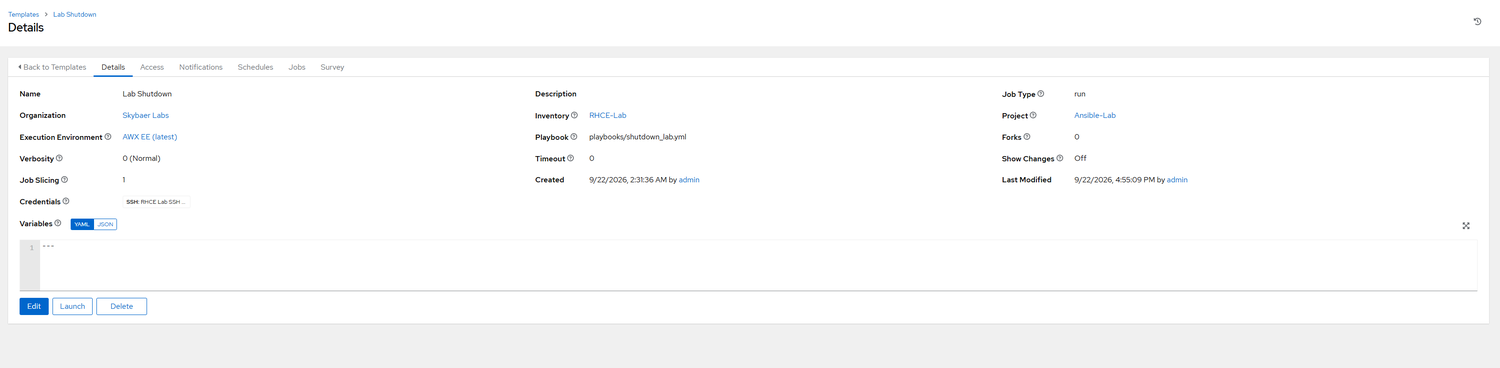
Lab Shutdown runs playbooks/shutdown_lab.yml from the Ansible-Lab project against the RHCE-Lab inventory. Every job template in the lab shares that same Project and Inventory, rather than one-off copies wired up per template.
A survey instead of a hardcoded target
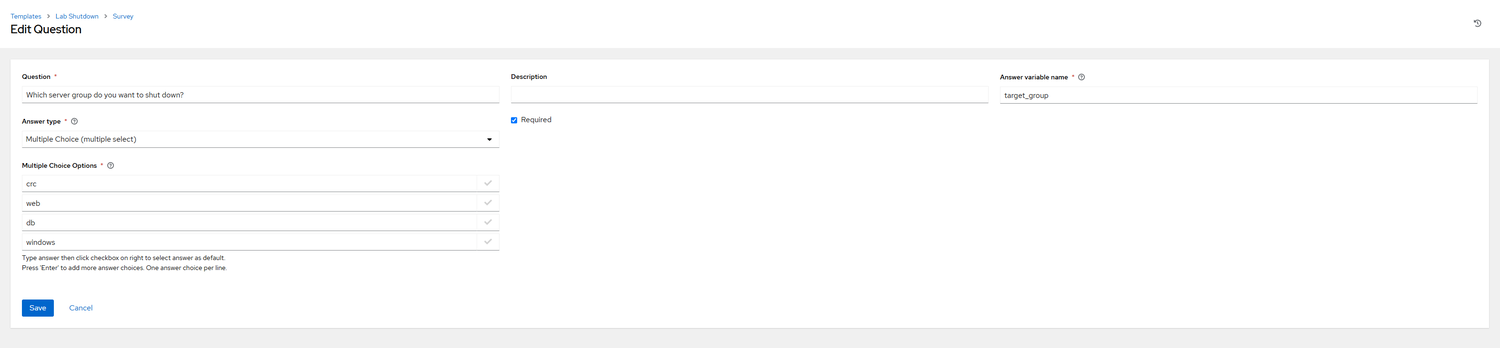
Launching the template asks “Which server group do you want to shut down?” It’s a required, multi-select survey question (variable: target_group, options: crc, web, db, windows) instead of a fixed host group baked into the playbook. The playbook reads target_group at runtime and joins whichever groups were picked.
Execute-only, by team

Fire Team holds an Execute role scoped to just the Lab Shutdown template: not Admin, not Edit, just permission to run it. Its members inherit that access by being on the team rather than each getting an individual grant on the template.
Access isn’t all-or-nothing
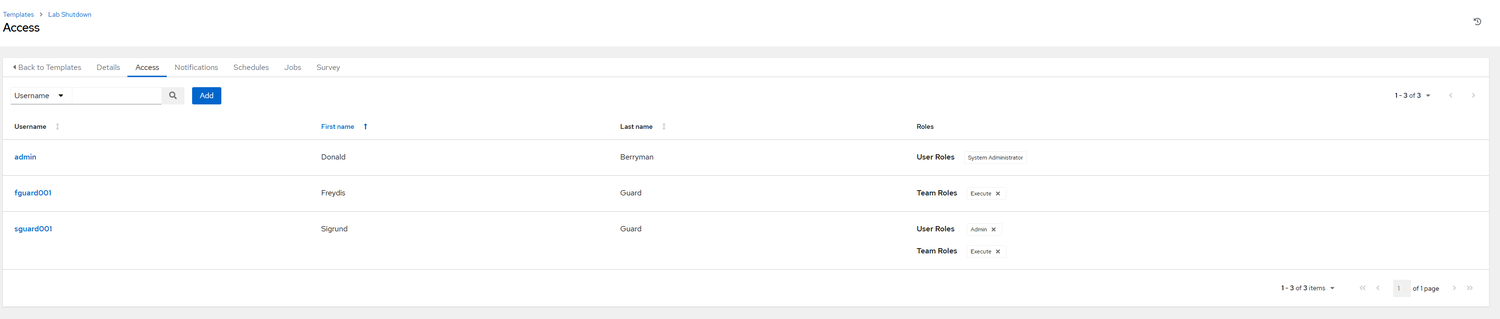
The same template shows three levels of access side by side: fguard001 gets Execute only, inherited through Fire Team membership; sguard001 holds that same team-inherited Execute role plus an individual Admin grant layered on top; and my own account holds System Administrator across the whole instance. Same object, layered permissions instead of one flat role.
Real Troubleshooting
Two bugs from the lab, start to finish
SSH to a Windows host, blocked by a firewall profile
sshd firewall rule was scoped to the “Private” network profile, but Windows had classified the lab’s network adapter as “Public,” so the rule silently never applied.Set-NetConnectionProfile. Getting Ansible itself working against the host took a few more overrides: ansible_user=jayberryman (Windows has no root account), ansible_shell_type=cmd (Ansible defaults to POSIX shell syntax), and swapping the ad hoc test module from ping to win_ping.A host var that wouldn’t stick
ansible_shell_type kept vanishing whenever it was set via group_vars/host_vars files alongside the AWX Source-Control-synced inventory. AWX’s stored Variables view wouldn’t show it, and jobs against winlab2025 failed again.key=value syntax instead of YAML-style key: value) gets picked up correctly on sync. group_vars/host_vars files placed next to an SCM-sourced inventory still get dropped; inline, INI-style inventory vars are now the reliable way to set it.Inventory Layout
How the same five hosts get grouped for Ansible
The topology diagram up top shows how these hosts are wired together physically. This is
the other layer: how Ansible’s inventory groups them logically, which is what
target_group actually intersects against. IPs redacted below; everything else
is the real file.
Five groups, one flat file
control.lab, node1.lab, node2.lab, node3.lab, node4.lab, rhel10-crc.local, and winlab2025 split into five groups: control, web, db, crc, and windows. Play 1 of the playbook above intersects target_group against the first four; Play 2 intersects it against windows alone.
Synced from GitHub, not retyped into AWX
AWX’s RHCE-Lab inventory is a Source Control-based Inventory Source pointed at this same file in the lab’s GitHub repo, rather than the groups being re-entered by hand in AWX’s UI. control.lab and AWX run against identical group definitions because they’re reading the same file.
The fix that actually stuck
ansible_shell_type=cmd lives right here under [windows:vars], using the inventory file’s own INI-style key=value syntax. That’s the fix from the troubleshooting section above: the same variable set through group_vars/host_vars files next to an SCM-synced inventory kept getting dropped on sync.
[control]
control.lab

[web]
node1.lab
node2.lab

[db]
node3.lab
node4.lab

[crc]
rhel10-crc.local

[windows]
winlab2025 ansible_user=jayberryman

[windows:vars]
ansible_shell_type=cmd
Playbook Structure & Role Design
The playbook behind the job template above
target_group, target_user_ID, target_comment, and
target_temp_passwd are all AWX survey variables. Nothing in the playbook itself
hardcodes a host list or a specific account.
One survey, two platforms
A single AWX survey variable, target_group, decides which play runs. Play 1’s hosts: line intersects it against ['crc', 'web', 'db', 'control'] for Linux; Play 2 intersects that same variable against ['windows']. One playbook covers both platforms instead of maintaining two.
Skips instead of failing
Both plays check for the account first, Linux via ansible.builtin.getent, Windows via win_user in query mode, and print a debug message instead of erroring out when it’s already there. Rerunning against an existing account is a no-op, not a failed job.
Temp password, forced rotation
Linux accounts get a password_hash('sha512')’d temp password, then chage -d 0 expires it immediately so the first login forces a change. Windows accounts reach the same result through win_user’s own password_expired: true.
# -------------------------------------------------------------
# Play 1: Create user accounts on local Linux VMs
# -------------------------------------------------------------
- name: Create user accounts on Linux Servers
  hosts: "{{ target_group | intersect(['crc', 'web', 'db', 'control']) | join(',') or 'no_match' }}"          # Matches your Linux group in your inventory
  become: true              # Escalates privileges to root
  gather_facts: false       # Optional: Skips setup phase to speed up the process
#
  tasks:
  - name: Checking to see if account exists
    ansible.builtin.getent:
      database: passwd
      key: "{{ target_user_ID }}"
      fail_key: False
#
  - name: Create Linux accounts
    when: ansible_facts.getent_passwd[target_user_ID] is none
    ansible.builtin.user:
      name: "{{ target_user_ID }}"
      comment: "{{ target_comment }}"
      password: "{{ target_temp_passwd | password_hash('sha512') }}"
#
  - name: Pass message stating account was skipped because it already exists
    when: ansible_facts.getent_passwd[target_user_ID] is not none
    ansible.builtin.debug:
      msg: "{{ target_user_ID  }} already exists. Skipping... "
#
  - name: Force password to change after login
    when: ansible_facts.getent_passwd[target_user_ID] is none
    ansible.builtin.command:
      chage -d 0 "{{ target_user_ID }}"

# -------------------------------------------------------------
# Play 2: Create user accounts on local Windows VM
# -------------------------------------------------------------
- name: Create user accounts on Windows Server
  hosts: "{{ target_group | intersect(['windows']) | join(',') or 'no_match' }}"          # Matches your Windows group in your inventory
  become: false
  gather_facts: false
#
  vars:
    ansible_shell_type: cmd
#
  tasks:
    - name: Check to see if account exists on Windows servers
      ansible.windows.win_user:
        name: "{{ target_user_ID }}"
        state: query
      register: state_status
#
    - name: Create user account on Windows servers
      when: state_status.state == 'absent'
      ansible.windows.win_user:
        fullname: "{{ target_comment }}"
        name: "{{ target_user_ID }}"
        password: "{{ target_temp_passwd }}"
        update_password: on_create
        password_expired: true
#
    - name: Pass message stating account was skipped because it already exists
      when: state_status.state == 'present'
      ansible.builtin.debug:
        msg: "{{ target_user_ID  }} already exists. Skipping... "
Real Test Output
Same playbook, two platforms, two runs
Each side shows a first run against a fresh account, then a rerun once that account already exists. Real AWX/console output, trimmed of IPs, SIDs, and PowerShell CLIXML noise; everything else, including a leftover typo in the test account’s name, is exactly what came back.
TASK [Create user account on Windows servers] ****************************
changed: [winlab2025] => {
    "changed": true,
    "fullname": "Jane Does",
    "invocation": {
        "module_args": {
            "name": "jdoe001",
            "fullname": "Jane Does",
            "password": "VALUE_SPECIFIED_IN_NO_LOG_PARAMETER",
            "password_expired": true,
            "update_password": "on_create"
        }
    }
}

TASK [Pass message stating account was skipped because it already exists] **
skipping: [winlab2025] => {
    "false_condition": "state_status.state == 'present'"
}

PLAY RECAP *****************************************************************
winlab2025                 : ok=2    changed=1    unreachable=0    failed=0    skipped=1    rescued=0    ignored=0

# --- rerun: account already exists ---

TASK [Check to see if account exists on Windows servers] *******************
ok: [winlab2025] => {
    "changed": false,
    "fullname": "Jane Does",
    "invocation": {
        "module_args": {
            "name": "jdoe001",
            "state": "query"
        }
    },
    "msg": "Querying user 'jdoe001'"
}

TASK [Create user account on Windows servers] *******************************
skipping: [winlab2025] => {
    "changed": false,
    "false_condition": "state_status.state == 'absent'",
    "skip_reason": "Conditional result was False"
}

TASK [Pass message stating account was skipped because it already exists] **
ok: [winlab2025] => {
    "msg": "jdoe001 already exists. Skipping... "
}

PLAY RECAP *****************************************************************
winlab2025                 : ok=2    changed=0    unreachable=0    failed=0    skipped=1    rescued=0    ignored=0
TASK [Force password to change after login] ********************************
changed: [node2.lab] => {
    "changed": true,
    "cmd": ["chage", "-d", "0", "sguard001"],
    "rc": 0
}

[WARNING]: Could not match supplied host pattern, ignoring: no_match
PLAY [Create user accounts on Windows Server] *******************************
skipping: no hosts matched

PLAY RECAP *******************************************************************
node1.lab                  : ok=3    changed=2    unreachable=0    failed=0    skipped=1    rescued=0    ignored=0
node2.lab                  : ok=3    changed=2    unreachable=0    failed=0    skipped=1    rescued=0    ignored=0
node3.lab                  : ok=3    changed=2    unreachable=0    failed=0    skipped=1    rescued=0    ignored=0
node4.lab                  : ok=3    changed=2    unreachable=0    failed=0    skipped=1    rescued=0    ignored=0

# --- rerun: accounts already exist ---

TASK [Pass message stating account was skipped because it already exists] ***
ok: [node3.lab] => { "msg": "sguard001 already exists. Skipping... " }
ok: [node4.lab] => { "msg": "sguard001 already exists. Skipping... " }

TASK [Force password to change after login] *********************************
skipping: [node1.lab] => {
    "changed": false,
    "false_condition": "ansible_facts.getent_passwd[target_user_ID] is none",
    "skip_reason": "Conditional result was False"
}
skipping: [node2.lab] => { ...same... }
skipping: [node3.lab] => { ...same... }
skipping: [node4.lab] => { ...same... }

[WARNING]: Could not match supplied host pattern, ignoring: no_match
PLAY [Create user accounts on Windows Server] ********************************
skipping: no hosts matched

PLAY RECAP ********************************************************************
node1.lab                  : ok=2    changed=0    unreachable=0    failed=0    skipped=2    rescued=0    ignored=0
node2.lab                  : ok=2    changed=0    unreachable=0    failed=0    skipped=2    rescued=0    ignored=0
node3.lab                  : ok=2    changed=0    unreachable=0    failed=0    skipped=2    rescued=0    ignored=0
node4.lab                  : ok=2    changed=0    unreachable=0    failed=0    skipped=2    rescued=0    ignored=0